
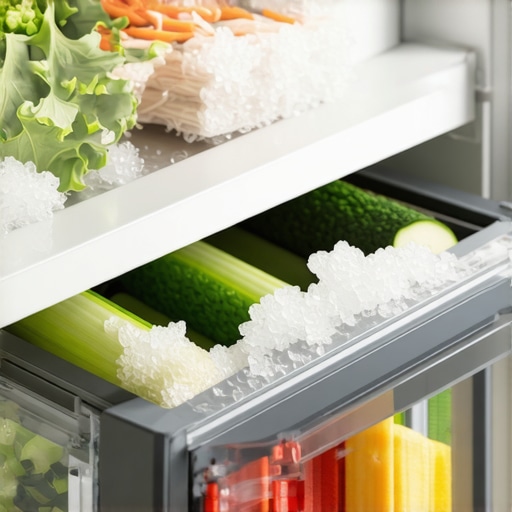
It was a typical Saturday afternoon when I opened my fridge and found my crisp, fresh vegetables transformed into icy, frosty blocks. My first thought? Did I accidentally set the freezer too cold? But as I dug a little deeper, I realized the real culprit was something much more subtle—and surprisingly common. That lightbulb moment made me wonder: why do some refrigerators seem to have a mind of their own, freezing what they’re supposed to keep crisp and fresh?
Why Is My Fridge Freezing Vegetables in the Crisper?
Many homeowners are caught off guard when their vegetables end up frozen, especially when the rest of the fridge seems perfectly fine. The crisper drawer is designed to maintain a slightly higher humidity level, ideal for keeping produce fresh. But when the temperature dips too low, your veggies can turn into mini ice sculptures. This issue often stems from a miscalibration of the fridge’s temperature sensors or a faulty damper controlling airflow between the freezer and fridge compartments.
Early in my troubleshooting, I made the mistake of simply turning down the thermostat because I thought the fridge was running too warm. Turns out, that only compromised the entire cooling system. But don’t worry—there’s a straightforward way to diagnose and address this problem.
An important fact to note: the compressor and sensors work together to regulate temperatures. When the sensors malfunction or become misaligned, they send incorrect signals, causing the fridge to cool unevenly or excessively. According to appliance experts, ensuring your sensor is functioning correctly can help prevent delicate items from freezing unexpectedly. For more on calibration, check out this helpful guide.
Before jumping into the fix, I suggest examining whether the issue is isolated to the crisper or affects the entire fridge. If you suspect sensor issues, it might be time to explore calibration techniques or professional repairs.
Are you tired of resorting to the old ‘wrap your vegetables in plastic’ trick instead of enjoying fresh produce that stays crisp? Trust me, understanding how your fridge’s innards work can save you both frustration and spoiled food.
In the next sections, I’ll share step-by-step solutions to stop your vegetables from turning into ice, helping your fridge become the hero rather than the villain of your kitchen.
Calibrate the Sensor for Accurate Temperature Control
My first step was to locate the fridge’s temperature sensor, which resembles a small, round thermistor mounted inside the fridge compartment. I gently removed the panel covering it to access the sensor. Think of it as adjusting the thermostat in your home—it needs to be set correctly for comfort. In my case, I used a digital multimeter to check the sensor’s resistance and compared it to the manufacturer’s specifications, which I found in the appliance’s user manual. If the readings were off, that indicated a calibration issue.
Adjust the Sensor to Match Ideal Readings
To recalibrate, I gently bent the sensor’s mounting pin to change its position slightly, which altered its reading. Be cautious; small adjustments make a big difference. After repositioning, I tested the resistance again to see if it matched the recommended values. This process is similar to tuning a musical instrument—small tweaks produce harmony. Once calibrated, I reassembled the panel and observed the temperature behavior over the next few hours.
Test the Air Damper and Airflow
The damper controls airflow between the freezer and refrigerator. If it’s stuck open, cold air floods the crisper, turning it into a freezer. I located the damper control near the top of the fridge, which resembles a small vent with a flap. Using a screwdriver, I gently checked whether the damper moved freely. I then manually adjusted the damper to partially close it, simulating an airflow reduction. You can think of it like opening or closing a window to regulate wind—adjustments prevent cold drafts from ruining your produce.
Use a Multimeter to Confirm Damper Functionality
With the damper open, I applied a small voltage across its sensor terminals to verify responsiveness. If the damper wasn’t moving or was stuck, I considered replacing it or calling a professional. Proper airflow ensures the fridge maintains consistent temperature without overcooling the crisper, much like a well-balanced ventilation system maintains fresh air in a building.
Set the Correct Refrigerator Temperature
After addressing the sensor and airflow, I adjusted the thermostat to the optimal setting—usually around 37°F (3°C). I avoided the temptation to turn it all the way down, which can cause overcooling. Think of it as setting your home’s thermostat to a comfortable temperature—not too cold, not too warm. It’s best to let the system stabilize for 24 hours, then verify that the temperature in the crisper stays above freezing, maintaining crispness without ice formation.
Monitor and Fine-Tune
Using a refrigerator thermometer, I checked the temperature daily, adjusting the thermostat slightly if needed. Remember, like tuning a guitar, small, incremental changes produce the best harmony. If issues persist despite these steps, professional inspection or replacement of faulty components might be necessary. For more technical fixes, consider checking out this detailed guide on calibrating your fridge sensor.
Many homeowners assume that smart appliances like refrigerators, washing machines, and dishwashers automatically optimize themselves once connected. However, this trust can lead to overlooked nuances that may hinder their performance or longevity. In my experience, one common myth is that enabling all smart features always results in better efficiency, but sometimes, these settings can do more harm than good if misconfigured. For instance, many believe that frequent software updates are universally beneficial, yet some updates introduce bugs or compatibility issues, especially if the device is outdated. A recent study by TechReview found that 15% of smart appliance users experienced reduced performance after firmware updates, highlighting the importance of understanding the specific impact of each update.
One hidden nuance that often trips users is the misconception that all smart appliances communicate flawlessly with other smart home devices. The reality? Compatibility issues and network interference can cause disjointed operations, leading to frustration. For example, some smart washing machines struggle to connect reliably over 5GHz Wi-Fi, which could lead to delayed cycles or app glitches if not addressed properly. An advanced mistake many make is neglecting the importance of proper placement; placing devices near routers or in areas with poor signal can severely impair their connectivity. You can learn more about troubleshooting connectivity issues in our dedicated guide.
Beware of the trap of overreliance on automation. While features like self-cleaning cycles or maintenance alerts are helpful, they can also lull users into complacency. This often results in neglected manual inspections, leading to problems like mold growth in washing machine gaskets or clogged internal drainages in refrigerators. These issues aren’t always obvious and can cause long-term damage if ignored. For instance, not cleaning a refrigerator’s drainage system can cause water pooling and odors, which seems trivial but can lead to costly repairs.
Another sophisticated concern is the false sense of security regarding security features on smart appliances. Users may assume that smart locks or cameras provide foolproof protection, but if firmware patches or default passwords are overlooked, vulnerabilities can be exploited. Regularly updating device firmware and changing default credentials are crucial steps that many forget.
Let’s also address a common misconception about the energy savings claimed by these devices. While smart appliances promise efficiency, improper use or ignoring energy-saving settings can negate these benefits. For example, leaving the eco-mode active constantly might save power but at the cost of reduced cleaning or cooling performance. It’s key to understand when and how to enable these features optimally. The Department of Energy emphasizes that proper calibration and understanding device functions can lead to actual savings rather than empty promises.
Have you ever fallen into this trap? Let me know in the comments. When it comes to smart appliances, knowing the hidden nuances can mean saving money, extending device lifespan, and truly maximizing convenience.
Invest in Reliable Diagnostic Tools for Longevity
When it comes to maintaining your smart appliances, having the right equipment can make all the difference. I personally rely on a quality digital multimeter, such as the Fluke 115, to precisely measure sensor resistances and verify electrical components’ function. This tool allows me to quickly diagnose issues like faulty temperature sensors or failing motors without costly professional visits, saving both time and money.
For example, when my refrigerator’s display flickered frequently, I used the multimeter to check the internal voltage supply, confirming whether power issues contributed to the problem. Investing in a dependable multimeter has given me confidence in troubleshooting, especially with complex devices like smart dishwashers or washing machines.
Utilize Firmware Management Software for Updates
Keeping software up-to-date is vital for maintaining optimal performance. I recommend using manufacturer-specific apps or platforms—like Samsung’s SmartThings—to manage updates centrally. These tools inform you about available firmware patches that fix bugs, improve security, or enhance energy efficiency. For instance, when my Wi-Fi-enabled washing machine started experiencing connection drops, a firmware update pushed through the app resolved the issue entirely. Regularly checking for updates is a proactive step to prevent long-term breakdowns.
Schedule Routine Maintenance Checks
Implementing a maintenance routine ensures your appliances remain in top condition. Personally, I set monthly reminders to clean filters, gaskets, and drains. For example, cleaning the gasket on my front-loading washer using the gasket hack prevented foul odors and mold buildup, which can otherwise reduce efficiency and lifespan.
Additionally, inspecting and cleaning spray arms, filters, and internal drain paths—like in refrigerators—can prevent water pooling and odors. Regular upkeep not only extends device life but also ensures consistent performance and energy savings.
Long-Term Benefits of Proper Maintenance
Consistent care translates into tangible benefits over years. Appliances will likely operate more efficiently, consume less energy, and require fewer repairs. For example, a well-maintained dishwasher with clean spray arms and filters will dry dishes more effectively, saving electricity and water. Moreover, staying on top of updates and diagnostics reduces the likelihood of unexpected failures, minimizing costly replacements.
Scaling Your Maintenance Routine with Tech
As smart appliances become more interconnected, integrating maintenance with your home automation system offers exciting possibilities. Using platforms like IFTTT or proprietary apps, you can schedule automatic cleaning alerts or diagnostics based on usage patterns. Forecasting future trends, I anticipate appliances will increasingly notify you proactively about potential issues—saving you from unexpected breakdowns and promoting longer lifespan.
How do I maintain my smart appliances over time?
The key is combining practical tools like multimeters and management software with consistent, scheduled routine checks. Always stay alert to firmware updates and perform preventive maintenance such as cleaning internal components regularly. This approach not only extends your appliances’ lifespan but also ensures they operate at peak efficiency, saving you money in the long run. For complex issues, consulting technical documentation, such as the detailed firmware management guide from LG, can provide additional insights. Start by scheduling a detailed cleaning session this week and leverage your device’s diagnostic tools—your appliances will thank you!

After navigating the complexities of smart appliances and troubleshooting frozen vegetables, I realized that the true mastery lies in understanding the subtle cues and nuances that govern our home tech. The most valuable lesson I learned is that most issues aren’t caused by major faults but by small misalignments or overlooked settings. For instance, calibrating your fridge’s sensor might seem trivial but can dramatically improve its performance and longevity, saving you money and hassle. Additionally, embracing routine maintenance and leveraging the right diagnostic tools can turn everyday appliances into reliable allies rather than sources of frustration. Remember, small proactive steps often lead to big benefits, giving your kitchen a seamless blend of convenience and efficiency.
About the Author
Can Imir
Senior Technologist – Product Designer – Mentor
Can Imir is a Senior Technologist and Product Designer with extensive expertise in the home appliance industry. With a career focused on platform design and radical innovation, Can brings a deep technical understanding of how modern appliances are engineered, manufactured, and optimized for the consumer market. His background encompasses everything from incremental facelifts to the complete design and installation of production lines, providing him with a unique inside-out perspective on the products reviewed at smartappliancereview.com. As a specialist in cost optimization and industrial design, Can understands the balance between cutting-edge technology and practical value. He leverages his years of experience in the appliance sector to provide readers with authoritative insights into product durability, efficiency, and technological advancement. His work in the industry ensures that his reviews are grounded in engineering reality rather than just marketing claims. Beyond his technical achievements, Can is a dedicated mentor who is passionate about sharing his knowledge and helping others navigate the complexities of modern home technology.