
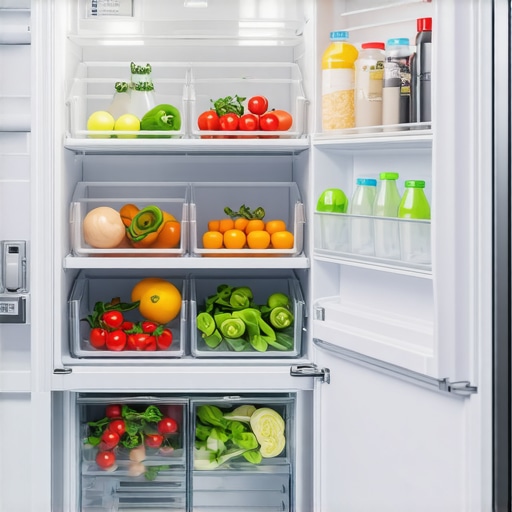
Ever opened my refrigerator and been greeted by a slush of spoiled leftovers or a mysterious sour smell? It’s the worst feeling, and it dawned on me one day that it all boiled down to how I was loading the fridge. I used to cram everything in like a game of Tetris, thinking more is better. But surprise—overloading actually hampers proper airflow, making my appliances work harder and my food spoil faster.
That lightbulb moment kicked off a journey to understand the best way to load your fridge for maximum airflow. Not only did the freshness improve, but I also noticed my energy bills dip—turns out, a well-organized fridge is kinder to your wallet. Today, I want to share what I’ve learned from my own experience and some expert tips, so you can avoid costly mistakes and keep your food fresher longer.
Why Proper Refrigerator Loading Is More Than Just Clutter Control
Think about your fridge as a living, breathing organism. For it to do its job effectively—keeping your food cold and fresh—it needs good airflow. When groceries are packed tightly, air can’t circulate freely, creating cold spots and warm pockets. This imbalance not only shortens the lifespan of perishables but also strains your appliance, leading to higher energy consumption.
Early on, I made the mistake of stacking bottles and containers aimlessly. That clutter blocked air vents and caused my fridge to run constantly. A simple rearrangement made a significant difference. Properly loading your fridge allows cold air to reach every corner, maintaining consistent temperatures and saving energy. In fact, according to a recent study, poor airflow contributes to 20% higher energy use in household refrigerators.
Have you ever faced a fridge that seems to work overtime or food that spoils too quickly? You’re not alone. Many homeowners overlook the importance of loading techniques and end up paying the price.
Let’s explore practical ways to optimize airflow, starting with the common pitfalls and how to avoid them.
Arranging Food Like a Pro
Start by clearing a small workspace—remove expired or spoiled items. Place taller items, such as soda bottles or juice cartons, at the back or along the sides to prevent blocking airflow. Use stackable containers to organize smaller items, keeping them in neat rows. I once took everything out and reorganized my fridge into zones: dairy on the top shelf, vegetables in the crisper, meats on the bottom. This not only improved airflow but also made finding items faster.
Utilize Air Vents Effectively
Identify the location of your fridge’s air vents—usually along the back wall or at the top. Ensure no large containers are blocking these vents. Think of them as the lungs of your refrigerator; if airflow is restricted, the fridge has to work harder. Once I moved bulky packages away from vents, my fridge cooled more efficiently and I noticed a reduction in energy consumption. Proper airflow management can significantly improve performance.
Keep Similar Items Together
Store items of the same type in designated areas—dairy together, beverages together, vegetables in a specific drawer. This prevents unnecessary rearranging and reduces the risk of blocking air pathways. I kept my condiments in one door compartment, avoiding stacking bottles in the middle, which caused blockages. Organizing this way made it easier to maintain a flow of cold air.
Don’t Overpack the Fridge
Overloading is like stuffing a closet—clothes can’t breathe, and neither can your fridge. Aim to fill the space about 70-80%, leaving room for air circulation. I once tried to squeeze in an extra pizza box, and my fridge started running constantly. After removing that, it cooled better and used less energy. Think of it as providing your fridge with the space it needs to do its job effectively.
Maintain Clear Food Shelves
Place items in a way that allows air to flow freely around each item. Avoid stacking items directly on top of each other; instead, use shelves and clear containers. I learned this when I stacked milk cartons so high that the air couldn’t circulate, which caused uneven cooling. Regularly checking and adjusting your arrangement keeps your fridge efficient and your food fresh.
Many homeowners assume that upgrading to smart appliances automatically guarantees efficiency and longevity, but the truth is more complex. One prevalent misconception is that all smart refrigerators or washers optimize energy use or performance out of the box. In reality, these devices often require proper calibration or specific settings to reach their full potential, as highlighted in expert reviews. For instance, setting your smart washer to the optimal water level can dramatically reduce water consumption—see how to do this effectively in our guide on how to set your washer for water savings.
Another common myth is that newer models always mean better performance. However, new technology can be a double-edged sword; some smart dishwashers, for example, feature complex Wi-Fi connectivity that can cause compatibility issues or false error codes if not configured properly. It’s essential to understand these nuances to avoid frustration.
A frequently overlooked aspect is the hidden tech inside these appliances that can actually hinder efficiency if misused. For example, many smart refrigerators have internal cameras which, while convenient for grocery management, can also lead to increased energy consumption if doors are left open frequently or if settings are not personalized properly. Proper calibration and understanding of device features can help mitigate this.
The trap most people fall into is relying solely on these devices to self-optimize without manual intervention. Many smart appliances come with customizable settings—that’s where the real savings and performance boost happen. For example, adjusting your dishwasher’s half-load cycle correctly leads to significant water and energy savings, instead of running a full cycle unnecessarily.
Advanced users might wonder, “How can I ensure my smart appliances are functioning at peak efficiency without constant troubleshooting?” This is where understanding device-specific calibrations becomes vital. Regularly updating firmware, and knowing how to perform resets or recalibrations, can prevent issues like unresponsive touchscreens or incorrect diagnostics, which are often rooted in outdated software. Here’s a comprehensive guide on how to reset your smart fridge after a power outage.
Did you know that ignoring these nuances can lead to increased costs and decreased appliance lifespan? A study by the Department of Energy shows that improper use of smart appliances can increase household energy bills by up to 15%. Integrating these insights can help you get the most out of your investments.
Have you ever fallen into this trap? Let me know in the comments. Exploring these hidden details ensures you harness your smart appliances’ full potential, rather than battling unnecessary frustrations.
Investing in the Right Tools for Longevity
Maintaining your smart appliances requires more than just regular use; it hinges on using precise tools designed for specific tasks. I personally rely on a digital multimeter to troubleshoot electrical issues and a microfiber cloth for delicate screens. The multimeter helps me identify electrical surges or faulty wiring early, preventing costly repairs. For cleaning touchscreens and control panels, a microfiber cloth paired with a gentle, appliance-safe cleaner ensures longevity without streaks. Using the right tools directly impacts your appliances’ lifespan and performance, saving you money and hassle in the long run.
Keep Software Updated to Prevent Glitches
Most modern appliances come with firmware that improves features and fixes bugs. I schedule monthly checks on my smart fridge and washer to ensure they’re running the latest software versions. Manufacturers often release updates that address security vulnerabilities and add compatibility with new smart home hubs, enhancing integration stability. Regular firmware updates are vital; forgotten updates can cause apps to crash or devices to become unresponsive, which is why I always use the manufacturer’s official app or website to verify the latest versions. Staying current helps maintain a smooth user experience and prevents long-term issues.
Establish a Routine Maintenance Schedule
Consistent maintenance prevents small problems from escalating. My routine includes weekly cleaning of filters, checking door seals, and running calibration cycles on my smart oven. For example, I follow manufacturer recommendations for deodorizing and cleaning refrigerator coils, which I learned helps prevent overheating and reduces energy consumption—this is discussed in detail in how to calibrate your smart oven. A scheduled maintenance routine ensures appliances operate at peak efficiency, prolongs their lifespan, and minimizes unexpected breakdowns. Consider setting reminders to keep track of these tasks—dedication now pays off with long-term savings.
Durable Calibration and Troubleshooting Methods
Over time, calibration drifts, leading to inefficient performance. I regularly recalibrate my refrigerator’s temperature sensors and washer’s load sensors—critical steps for optimal operation. Specific tools like a digital thermometer can confirm the fridge’s internal temperature, ensuring it stays within the ideal range. Calibration can significantly boost energy efficiency; improper settings can cause overwork, raising bills unnecessarily. For detailed calibration procedures tailored to your smart appliance, consult the manufacturer guides or trusted review sites. Promptly addressing calibration issues with the right tools keeps your appliances running smoothly and efficiently.
Long-Term Results and Cutting-Edge Trends
In the coming years, smart appliance maintenance is likely to evolve with AI-driven diagnostics and predictive analytics, making repairs smarter and more proactive. Future tools might include app-integrated sensors that notify you of component wear before failure or machine learning algorithms that optimize calibration settings in real time, enhancing efficiency. Staying ahead means adopting these technologies early; for instance, regularly updating your appliance firmware ensures compatibility with emerging tools and standards. I recommend trying out advanced calibration techniques and leveraging manufacturer apps—they can be game-changers for keeping your appliances in prime condition.
How do I maintain my appliances over time?
The key to long-term appliance health is a combination of precise troubleshooting tools, diligent software management, and scheduled maintenance routines. Incorporating diagnostics like multimeters, calibration tools, and app updates ensures your appliances operate efficiently and last longer. Don’t forget to regularly review manufacturer advice—sometimes, a simple firmware update or calibration tweak can dramatically improve performance. For example, calibrating your refrigerator’s sensors using a digital thermometer can prevent energy waste, as highlighted in our detailed guide. Make these practices part of your routine, and you’ll enjoy reliable, efficient appliances for years to come. Try starting with a calibration check on your smart fridge—it’s a simple step that offers immediate benefits.
Lessons the Appliance Industry Won’t Reveal
- I realized that more features aren’t always better; sometimes, simplicity in calibration and routine maintenance prevents costly repairs and keeps my smart appliances performing optimally.
- My biggest surprise was how much tiny adjustments, like firmware updates or recalibrating sensors, could extend the lifespan of my appliances—saving me from early replacements.
- I learned that understanding the internal tech—like internal cameras or sensors—helps me use my devices more efficiently, avoiding unnecessary energy drain or errors.
- Lastly, I found that proactive troubleshooting and scheduled checks often prevent small glitches from turning into expensive problems, which many overlook until it’s too late.
Tools and Resources That Made a Difference
- Manufacturer’s Official Apps: These are my go-to for firmware updates and troubleshooting guides, ensuring I get accurate and timely information directly from the source.
- Digital Multimeter: Trustworthy for diagnosing electrical issues silently and precisely, especially when testing calibration and sensor functions.
- Calibration Guides from Trusted Review Sites: Their step-by-step instructions help me fine-tune my smart appliances without risking damage, which is critical for optimal performance.
- Firmware Update Reminders: Setting calendar alerts for regular software updates keeps my devices running at peak efficiency and security.
Seize the Power to Enhance Your Home Appliance Experience
Taking control of your smart appliances through proper maintenance, calibration, and understanding their intricate tech empowers you to enjoy reliable, energy-efficient, and long-lasting devices. Remember, these aren’t just gadgets; they are long-term investments in your home comfort. Start small—perhaps with calibration of your fridge’s sensors—and watch how your confidence grows. The future of appliance care isn’t just about buying smart; it’s about mastering it. Are you ready to become the expert in your own smart home? Share your journey or ask questions below—let’s grow together!