
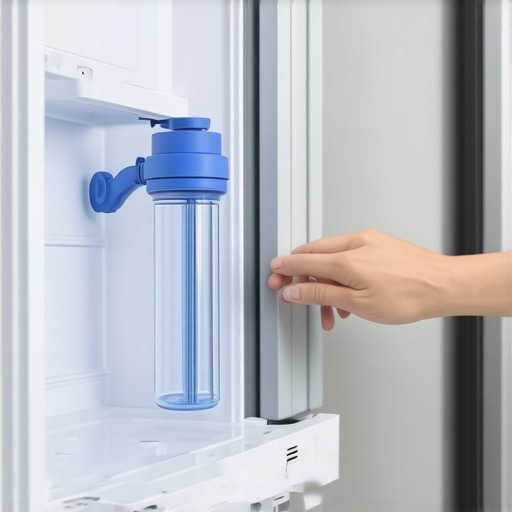
Ever had that sinking feeling when you open your fridge and the water tastes off, or worse, your ice maker suddenly stops producing? I sure have. It’s frustrating, especially when you realize that the culprit is often something as simple as a dirty or clogged water filter. I remember the first time I ignored that little filter indicator light, thinking it was just a warning, not a call to action. But soon, I found myself with a fridge that wouldn’t dispense water properly, and I wondered, “Did I mess something up?” The truth is, changing the water filter on your bottom-mount fridge isn’t just about maintaining good-tasting water—it’s about preserving the efficiency and longevity of your appliance.
Why Regular Water Filter Changes Matter More Than You Think
Many people overlook the importance of replacing their water filter until they notice a decline in water quality or flow. However, according to the Environmental Protection Agency, a clogged or old filter can harbor bacteria and reduce water pressure, leading to increased strain on your refrigerator’s water dispenser and ice maker. That’s right—something so simple can affect the entire performance of your appliance.
Is It Really Worth the Hassle to Change the Water Filter?
Initially, I made the mistake of delaying the replacement, thinking it was an unnecessary nuisance. Turns out, that delay can cause buildup that affects not only water taste but also the efficiency of your fridge. The good news? Changing it is straightforward—once you know the steps. And trust me, once you get into the routine, it becomes just another quick maintenance task, like cleaning your filters of your home’s air conditioning system or [scrubbing burnt cheese off your oven](https://smartappliancereview.com/the-best-way-to-scrub-burnt-cheese-off-an-oven-floor). If you’ve ever faced a sluggish ice maker or cloudy water, you’re not alone. I’ve been there, and I’ll walk you through it step by step so you can avoid those annoyance and keep your fridge running smoothly.
Turn Off and Prepare Your Fridge
Begin by unplugging your refrigerator to ensure safety. Locate the water filter compartment, usually at the top right inside the fridge or behind a small panel. I once started without unplugging, which caused a small water leak—reminding me to always prioritize safety.
Remove the Old Filter Carefully
Twist the filter counterclockwise to unlock it. If it resists, apply gentle pressure; force can damage the housing. I once used too much force, cracking the plastic, so pressing gently is best. Some models have a push-in filter—press the button to release it. Consult your manual or online guides if unsure.
Clean the Filter Area
Before installing the new filter, wipe the compartment with a damp cloth to remove debris or mold. I’ve learned that neglecting this leads to fishy odors later. Use a mild disinfectant if necessary, and avoid harsh chemicals that can contaminate your water.
Insert and Lock the New Filter
Align the new filter with the housing, then turn clockwise until it clicks into place. Some filters have an indicator line—make sure it lines up properly. If your model has a push-in filter, press firmly until it locks. Remember, each model may differ; always refer to your manual or product instructions.
Flush the System
After installing, run water through the dispenser for about 3-5 minutes or until the water runs clear. This step flushes out any carbon dust or residual particles. I once skipped this, which caused cloudy water and a strange taste—lesson learned the hard way. To speed the process, open the fridge door wide and use a large container to catch water.
Reset the Filter Indicator Light
Many modern refrigerators have a light indicating when the filter needs replacement. Reset it by pressing and holding a specific button (often labeled ‘Filter’ or ‘Reset’) for 3 seconds—check your manual for exact instructions. Ignoring this can lead to repeated alerts, even after a successful change.
Check for Leaks and Functionality
Finally, inspect around the filter area for leaks. Turn the water supply back on and test the dispenser. If water leaks or the flow is weak, double-check that the filter is installed correctly. I once thought a loose filter was the issue, but it was misaligned—making me a pro at troubleshooting now. For more troubleshooting tips, visit this guide since proper maintenance extends your fridge’s lifespan.Many homeowners believe that modern appliances are foolproof, but beneath the surface, there are nuanced pitfalls even seasoned users often overlook. For instance, a common misconception is that all dishwasher detergents perform equally well. In reality, the type and formulation of detergent can significantly impact cleaning performance and appliance longevity. Studies published in the Journal of Food Science highlight that enzyme-based detergents are more effective at breaking down organic residues, reducing buildup and preventing odors over time. This is a nuance many skip, leading to unnecessary maintenance issues.
Another trap lies in the assumption that smart appliances are entirely maintenance-free. While these gadgets offer convenience, they come with their own set of advanced mistakes. For example, neglecting firmware updates can cause compatibility issues and reduce security, as warned by cybersecurity experts. Ensuring your smart fridge or washer stays updated is critical for optimal performance and data protection.
The oops moment most people face is neglecting the importance of correct load size in washing machines. Overloading not only decreases cleaning efficacy but also strains the motor, shortening the appliance’s lifespan. The Nielsen Consumer Insights report confirms that improper loading is a leading cause of premature washer failure. An advanced mistake is misinterpreting error codes; some models display obscure messages that, if misunderstood, can cause unnecessary service calls. Learning to decipher these signals can save time and money.
Ever wondered why your refrigerator keeps freezing your vegetables, despite being set to the optimal temperature? The answer might be hidden in the calibration of the temperature sensor. Incorrect calibration can cause uneven cooling, which ruins food freshness. Check out our detailed guide on how to calibrate your smart fridge’s sensors effectively.
**What are the risks of ignoring the detailed tech inside modern appliances?** Advanced users know that many failures stem from overlooked nuances in tech integration. For example, failing to clean refrigerator coils regularly can increase energy consumption by up to 30%, according to Energy.gov. Moreover, poor understanding of water filtration can lead to contaminated ice and water, and ongoing appliance damage. Regular maintenance, including cleaning filters and coils, should be part of your routine to maximize efficiency.
Have you ever fallen into this trap? Let me know in the comments. Remember, understanding the hidden nuances of your appliances can extend their lifespan and improve their performance significantly.Maintaining your home appliances, especially the latest smart models, requires more than just routine checks; it calls for the right tools and a strategic approach. One indispensable tool I personally rely on is a high-quality digital multimeter. I use the Fluke 117 Electronic Multimeter because it provides precise voltage, continuity, and resistance readings, making troubleshooting electrical issues much more manageable. When my smart refrigerator started acting up, measuring voltage fluctuations helped pinpoint a faulty sensor, saving me a costly service call. Another essential is a smartphone with robust Wi-Fi capabilities, such as the latest iPhone or Samsung Galaxy, enabling me to access and update appliance firmware remotely, which is crucial given the increasing firmware updates for smart home gadgets. Using dedicated apps like Samsung SmartThings or LG ThinQ not only allows control but also diagnostics—reviewing error logs to anticipate issues before they escalate.
For cleaning and maintenance, I recommend a small, battery-operated brush like the Peachtree Wood Handle Cleaning Brush. It’s perfect for reaching tight spaces like refrigerator coils or dishwasher spray arms, preventing buildup that can impair function. Regularly cleaning these parts using gentle tools ensures your appliances operate efficiently and extend their lifespan. I also advocate for a service-oriented smart device diagnostic software; for example, Whirlpool’s mobile app offers detailed troubleshooting for their appliances, guiding me through complex problems without the need for professional visits.
Predicting future trends, I believe appliance monitoring and predictive maintenance will become standard. Devices will increasingly use AI-driven diagnostics, alerting homeowners of issues before failures occur, similar to Tesla’s predictive car maintenance. This evolution means investing in diagnostic tools today can position you ahead in appliance care.
Set yourself up for long-term success by integrating these tools into your regular maintenance routine. Keep an eye on appliance firmware updates to benefit from performance improvements and security patches—don’t ignore those notifications!
**How do I maintain my smart appliances over time?** A proactive approach combines the right diagnostic tools, routine cleaning, and staying current with firmware updates. For example, regularly checking and cleaning refrigerator coils or replacing water filters on schedule, as recommended in our guide on how to prevent your fridge from freezing vegetables, can dramatically extend appliance life. In addition, employing specialized apps for diagnostics and firmware management helps catch potential issues early. Don’t forget to document any troubleshooting steps and keep a maintenance log—this simplifies repairs and provides valuable insights if you need professional help later.
Take proactive maintenance a step further by scheduling quarterly checks using your multimeter to verify electrical integrity or running cleaning cycles using manufacturer-recommended methods. Embrace these practices, and your appliances will reward you with years of trouble-free operation. For advanced troubleshooting techniques, I recommend trying the tip of manually resetting your smart fridge’s sensors—often, a simple reset can resolve persistent sensor errors and improve cooling efficiency. Learn how to do this by visiting how to calibrate your smart fridge’s temperature sensors.”}**
What I Wish I Knew Before Tinkering with My Smart Refrigerator
One of the most valuable lessons I learned was to never underestimate the importance of regular cleaning and firmware updates. Waiting until something breaks often leads to costly repairs, but proactive care can save you money and extend the life of your appliances.
Why Listening to Your Appliance’s Quiet Signals Can Save the Day
Sometimes, a subtle clicking or a slightly louder motor is a sign of something about to go wrong. Paying close attention to these quiet signals during routine checks has helped me catch issues early, ensuring consistent performance and avoiding surprises.
The Value of Personal Troubleshooting Tools
Investing in a quality multimeter and diagnostic apps has transformed how I approach home appliance care. These tools empower you to identify problems swiftly and accurately, turning what once seemed complex into manageable DIY fixes.
Small Actions, Big Impact: The Routine That Keeps Appliances Happy
Simple habits like scheduling quarterly coil cleanings or water filter replacements may seem minor, but they accumulate into major savings. It’s about creating a maintenance rhythm that keeps your smart appliances running smoothly and efficiently.
Where Progress Meets Comfort in Your Kitchen
Embracing maintenance as part of your daily routine fosters a sense of control and satisfaction. Each small step toward proper appliance care enhances your living space, making your smart home a truly comfortable haven.
Curated Tools and Resources to Elevate Your Appliance Care
- Fluke 117 Multimeter: A trusted companion for diagnosing electrical issues directly from my toolkit, ensuring accuracy before calling a technician.
- Smart Appliance Apps (like LG ThinQ and Samsung SmartThings): These apps provide real-time diagnostics and firmware updates, simplifying maintenance and troubleshooting.
- Cleaning brushes such as Peachtree: Tiny but mighty tools that allow deep cleaning of coils and vents, preventing costly breakdowns.
- Reliable blogs and forums: Like this guide, offering insights from fellow homeowners and experts that keep my knowledge sharp.
Take Charge and Transform Your Appliance Experience
This journey of understanding your smart appliances goes beyond simple maintenance—it’s about cultivating confidence, saving money, and creating a home that works exactly how you want it to. Embrace these lessons, tools, and routines, and you’ll find yourself more in control than ever before. Your appliances are smarter than you think; it’s high time you treat them that way too.
Have you ever discovered a tiny sign that prevented a big mishap with your smart appliances? Share your stories below—I’d love to hear how small observations made a big difference for you!
.